
Your Ceiling Fan Has Been Running the Wrong Direction (And It’s Making You Sleep Hotter)
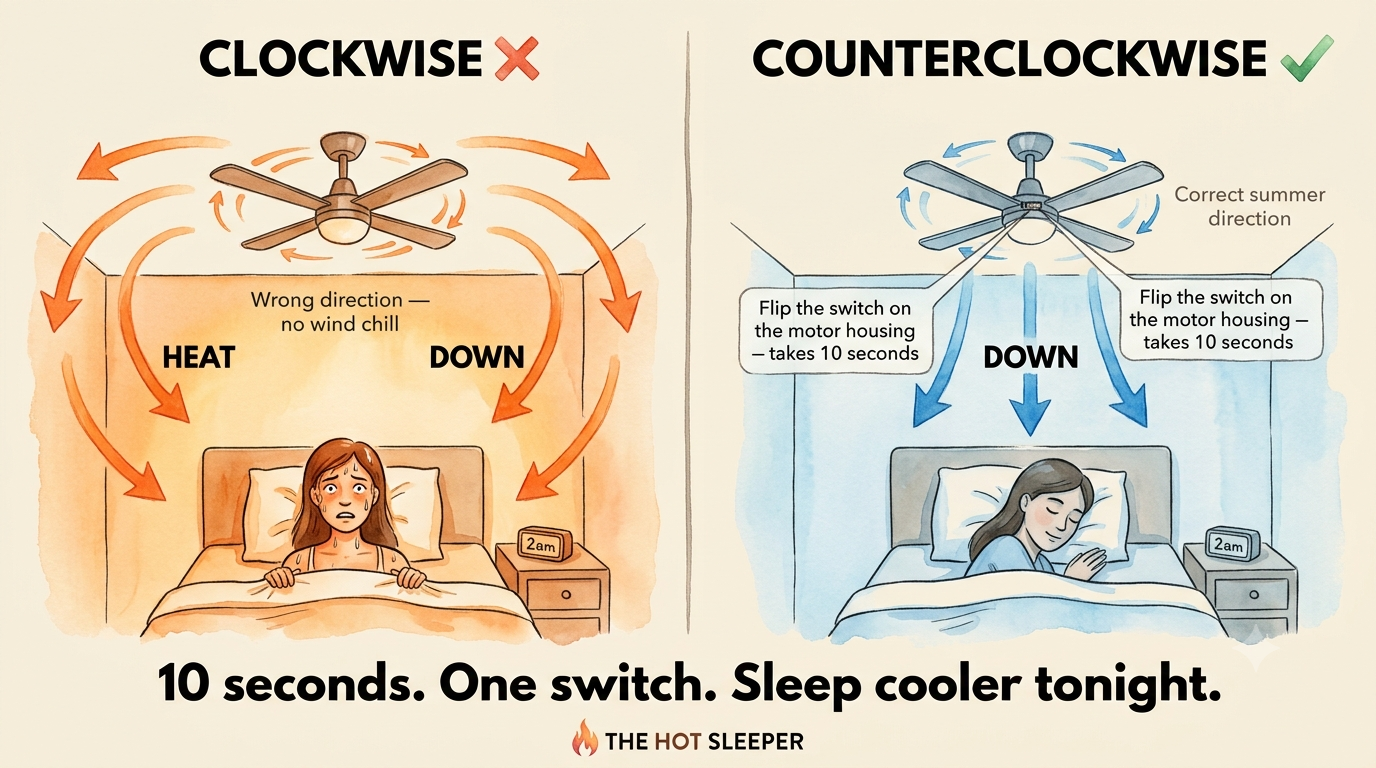
You’ve been sleeping with your ceiling fan on all summer. It’s running on high, pointed directly at your bed, and you’re still waking up at 2am soaked in sweat. The fan isn’t broken. It isn’t undersized. It’s running backwards.
Most ceiling fans ship with the direction switch set to clockwise — the winter setting — and most people never touch it. The result is a fan that spends every summer night producing zero wind-chill cooling while gently pushing warm ceiling air back down to where you sleep.
The fix is a 10-second switch on the motor housing. Here’s the physics of why it matters, how to find the switch, and what to expect when you flip it.
Why Clockwise Makes You Sleep Hotter
Hot air is less dense than cool air, so it rises. In any room, the warmest air in the space is pooled at the ceiling — sometimes 5–9°F (3–5°C) warmer than the air at mattress level, particularly in rooms with poor ventilation.
A ceiling fan running clockwise (viewed from below) creates an updraft in the centre of the room. Air gets pulled upward through the middle, pushed outward across the ceiling, and then flows back down the walls — carrying that warm ceiling air with it. It’s a circulation pattern designed to destratify warm air in winter, helping push trapped heat back down to living level and reducing heating costs.
In summer, that’s the last thing you want. Clockwise gives you no downdraft — so you lose the wind-chill effect entirely — while gently pushing slightly warmer ceiling air back down to mattress level. You’re not being blasted with hot air. You’re getting zero cooling plus marginally warmer air where you sleep. Running it on high makes it worse by increasing that circulation without adding any wind-chill benefit.
What Counterclockwise Actually Does
A ceiling fan running counterclockwise (viewed from below) pushes air straight down from the blades, creating a column of moving air directly beneath the fan. This is the downdraft you actually want in summer.
The cooling effect isn’t from the fan lowering air temperature — it doesn’t. A fan’s motor actually adds a small amount of heat to the room. The cooling you feel is wind chill: moving air accelerates evaporation from your skin, carrying heat away faster than still air can. The same mechanism that makes 72°F (22°C) with a breeze feel cooler than 72°F in still air.
According to the US Department of Energy, a ceiling fan running counterclockwise in summer allows you to raise the thermostat by around 4°F (2°C) with no reduction in comfort, because the wind-chill effect supplements the AC. If you don’t have AC, the wind-chill effect is the difference between tolerable and not.
One implication worth noting: because the cooling effect is wind chill on people — not temperature reduction in the room — turn the fan off when you leave. Running it in an empty room wastes electricity and adds motor heat without benefit to anyone.
How to Check Which Direction Your Fan Is Spinning
Turn your fan on at its lowest speed. Stand or lie directly below it and look up. Watch which way the blades are moving:
- Counterclockwise (blades moving like the top of a clock going backwards, right-to-left at the top) — correct summer direction. You should feel a direct downdraft beneath the fan.
- Clockwise (blades moving left-to-right at the top) — winter setting. You’ll feel little or no downdraft standing beneath it, because the airflow is being pushed outward and down the walls rather than straight down.
If it’s running clockwise, that’s your problem.
Where Is the Direction Switch?
Turn the fan off completely and wait for the blades to stop. The switch is on the motor housing — the central body of the fan, above the blades. It’s a small slider or toggle, usually labelled with arrows showing the two directions, or simply Forward/Reverse.
Flip it to the opposite position, then turn the fan back on. If you’re now getting a noticeable downdraft standing beneath it, you’ve switched to counterclockwise correctly.
On fans with a remote control, there’s usually a direction button on the remote as well — check the manual for your model.
One thing that trips people up: some fans feel like they’re pushing air down even when running clockwise, because the blade pitch and motor speed can create enough general air movement to feel like a breeze at higher speeds. The test is whether you feel a direct column of air beneath the fan on low speed — not just general air movement in the room.
Speed Setting: High Isn’t Always Better
Most people run their ceiling fan on high all night. That’s not always the right call.
On high speed, the downdraft is strong enough to disrupt bedding and create a drying effect on your skin that can wake lighter sleepers. Medium speed provides sufficient wind chill for most rooms while staying quiet enough not to disturb sleep.
High speed makes sense if your room is particularly hot (above 79°F / 26°C), your ceiling is higher than standard (so the fan is further away), or you’re a heavy sleeper who runs warmer than average. Medium is the default to start with — reduce to low if you’re finding the airflow disruptive, increase to high if you’re still uncomfortably warm.
Fan Placement Matters Too
A ceiling fan is most effective when the blades are 7–9 feet above the floor and 10–12 inches below the ceiling. If your fan is mounted flush to the ceiling (a common install in rooms with lower ceilings), the downdraft is weaker because there’s less clearance for air to accelerate before it reaches the blades.
Fan size also affects coverage. A 36–44 inch fan covers rooms up to roughly 225 square feet. A 52-inch or larger fan is needed for bigger rooms. Running a small fan in a large room on high speed produces a lot of noise with limited cooling reach — you’d do better with a correctly-sized fan on medium. See the full fan guide for hot sleepers for sizing recommendations and the best options at each price point.
Using Your Ceiling Fan With Air Conditioning
If you run AC, keep the ceiling fan counterclockwise and use it alongside the AC rather than instead of it. The wind-chill effect from the fan allows you to raise the thermostat by around 4°F while maintaining the same perceived comfort — which reduces AC runtime and electricity costs.
Avoid pointing a floor or pedestal fan directly at the AC unit’s output vent. This disrupts the cold air distribution before it can spread through the room. Position fans to supplement airflow toward your bed, not to redirect what the AC is already sending out.
The Other Thing Your Fan Can Do
A ceiling fan running counterclockwise cools people via wind chill. But it doesn’t lower the temperature of the air itself. If your room is genuinely hot — above 79°F (26°C) — wind chill alone may not be enough, particularly in the first hour of trying to sleep when your body is still trying to drop its core temperature.
- Cross-ventilation before bed: open a window on the opposite side of the room from a pedestal fan for 20–30 minutes after sunset, exhausting hot indoor air and drawing cooler outdoor air through. Once the room has dropped, close the windows and run the ceiling fan.
- The wet towel trick: a damp towel hung in front of a pedestal fan genuinely lowers air temperature through evaporation — not just wind chill. Full setup and the humidity conditions where it works here.
What If It’s Not a Ceiling Fan?
If you’re searching “why is my fan blowing hot air” and you have a pedestal, tower, or box fan — not a ceiling fan — the direction switch doesn’t apply. Portable fans don’t have one.
The answer is simpler: a fan cannot lower air temperature. It moves air. The motor inside adds a small amount of heat to the room. If the room air is warm, the fan is moving warm air — that’s all it can do. You feel wind chill from the airflow across your skin, but the air temperature itself doesn’t change.
What you’re experiencing isn’t a broken fan. It’s physics. Two things that actually fix it:
- Cross-ventilate: position the fan in a window facing outward to exhaust hot indoor air, and open a window on the opposite side to draw cooler outdoor air in. Works after sunset when outdoor air drops below indoor temperature.
- The wet towel trick: hang a damp towel in front of the fan to cool the air through evaporation before it reaches you. Lowers air temperature by 4–7°F (2–4°C) when humidity is below 60%. Full setup here.
Is It Normal for a Ceiling Fan to Get Hot?
The motor housing on a ceiling fan runs warm during normal operation — this is expected. If the housing feels warm to the touch after an hour of running, that’s normal.
What isn’t normal: a motor housing that’s hot enough to be painful to touch, or a burning smell. These point to one of three things:
- Dust buildup inside the motor housing — acts as insulation, trapping heat. Use compressed air to clear the vents annually.
- Worn bearings — create friction and excess heat. The fan will also become noisier and may wobble.
- Failing capacitor — causes the motor to draw more current than it should. Symptom: fan slow to start or runs slower than normal for its speed setting.
A fan showing any of those secondary symptoms should be replaced. See the fan guide for replacement options sized to your room.
Not sure if fan direction is the main issue?
Take the Hot Sleeper Diagnostic
Answer 5 questions and find out exactly what’s making you sleep hot — fan direction, bedding, mattress, or room temperature.
Take the Quiz →Frequently Asked Questions
Why is my ceiling fan blowing hot air?
Your ceiling fan is most likely running clockwise — the winter setting — which produces no downdraft at all. You lose the wind-chill cooling effect entirely, and warm ceiling air gets gently redistributed back down to room level. Switch to counterclockwise using the small toggle switch on the motor housing. Turn the fan off completely before flipping it.
Does ceiling fan direction actually make a difference?
Yes. The difference between clockwise (no downdraft, zero wind-chill, slightly warmer air at mattress level) and counterclockwise (direct downdraft, wind-chill effect on skin) can be 5–7°F (3–4°C) in perceived temperature. For hot sleepers, that’s often the margin between staying asleep and waking up in the middle of the night.
Where is the switch to change ceiling fan direction?
On the motor housing — the central body of the fan, above the blades. It’s a small slider switch, usually labelled with directional arrows or Forward/Reverse. Turn the fan off and wait for the blades to stop before flipping it. Some fans also have a direction button on the remote control.
Should I run my ceiling fan on high or low at night?
Start with medium. High speed increases the wind-chill effect but can be disruptive to sleep — strong airflow dries out skin and can wake lighter sleepers. Increase to high if you’re still too warm; reduce to low if the airflow is waking you up.
Does a ceiling fan cool the room?
No. A ceiling fan cools people via wind chill — it accelerates sweat evaporation from skin. The room air temperature stays the same or rises slightly (the motor adds heat). Turn it off when no one is in the room.
Can I use a ceiling fan and AC together?
Yes — and you should. A ceiling fan counterclockwise alongside AC allows you to raise the thermostat by around 4°F with no reduction in comfort, reducing AC runtime. Turn the fan off when you leave the room.